





by · MasLogin · October 9, 2025
In the Edit Profile page, the “Fingerprint Settings” section is used to configure the simulated browser’s characteristic parameters. These fingerprint settings can comprehensively emulate real devices and browser environments.
Fingerprint Settings List
After clicking 【Create Profile】, click 【Fingerprint Settings】 at the top of the edit page to enter the list.
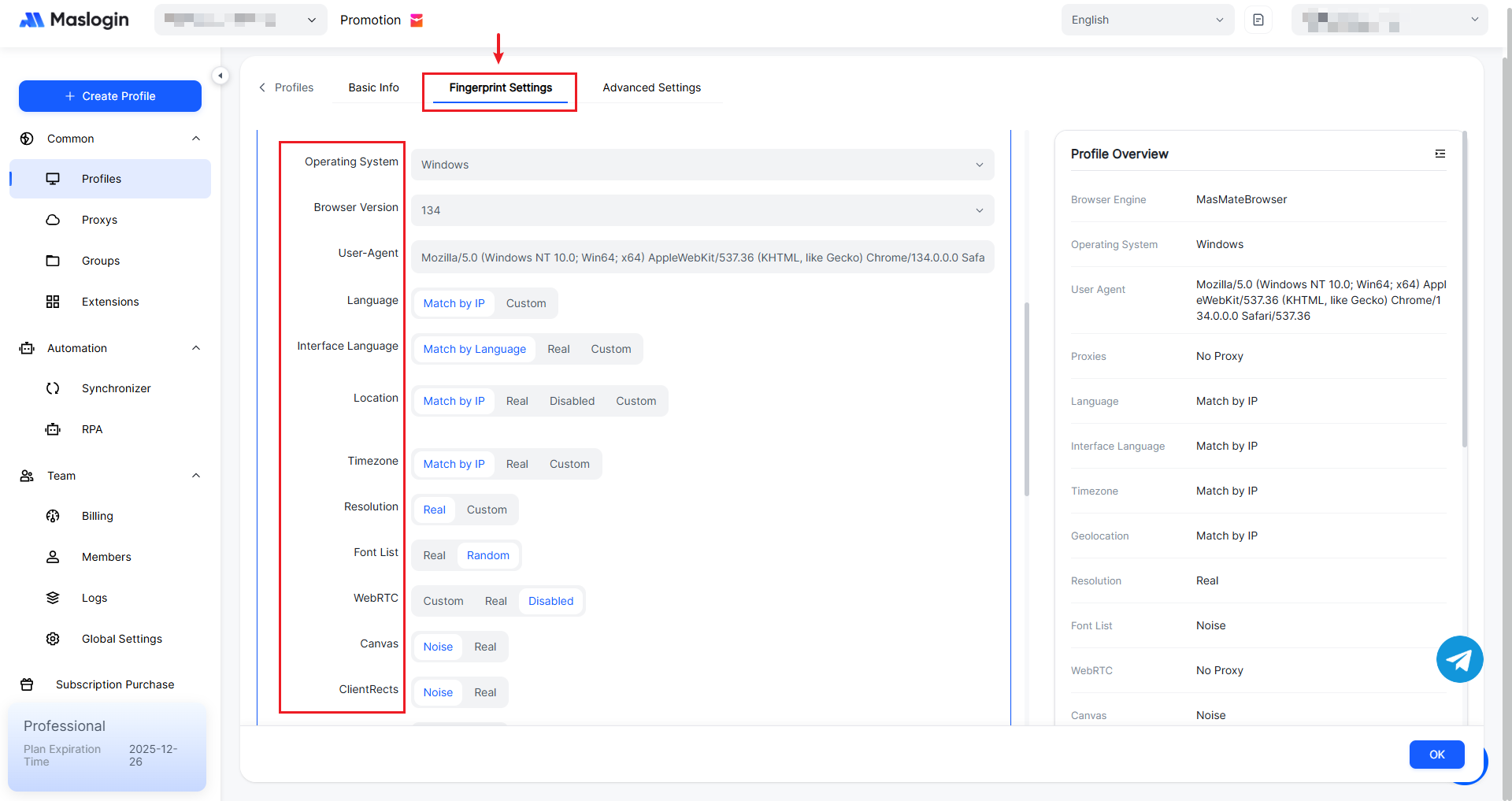
【Operating System】: Used to match different operating system environments, such as Windows, Linux, and macOS.
【Browser Version】: Used to match different browser versions, which affects browser features and behavior. The default is version 134.
【User-Agent】: A string sent by the browser or application to the server when visiting a webpage to identify itself. It includes information such as the operating system, browser type, and version, helping the server recognize the client environment.
【Language】: Sets the browser’s language preference. It can be matched by IP or customized, affecting the language in which web content is displayed.
【Interface Language】: Determines the display language of the browser’s own interface.
【Location】: Sets how the browser obtains geolocation information.
【Timezone】: Sets the browser’s time zone.
【Resolution】: Sets the browser’s screen resolution, affecting how webpages are displayed.
【Font List】: Sets the browser’s font list.
【WebRTC】: WebRTC is used for real-time communication. This setting affects whether it is enabled and what related information is exposed.
【Canvas】: Canvas fingerprinting is a device identification method based on Canvas drawing. Noise settings can increase fingerprint randomness.
【ClientRects】: ClientRects-related fingerprint settings used to simulate different client rectangle information.
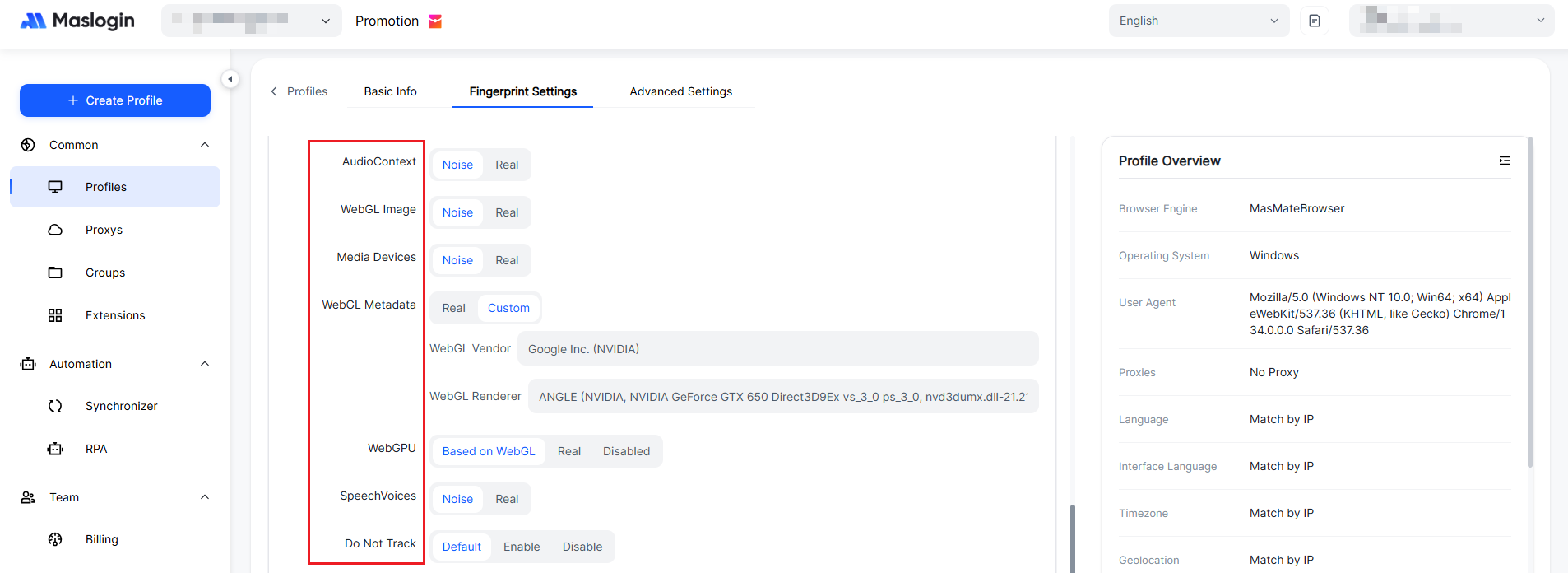
【AudioContext】: AudioContext-related fingerprint settings that affect the identifying information of the audio context.
【WebGL Image】: WebGL image fingerprinting. WebGL is used for 3D rendering, and this setting affects image-related identifiers.
【Media Devices】: Sets media-device-related fingerprints to simulate different media device environments.
【WebGL Metadata】: You can choose real or custom WebGL metadata, including WebGL vendor, renderer, and more.
【WebGPU】: WebGPU is a next-generation graphics API. This setting affects whether it is enabled and what related information is exposed.
【SpeechVoices】: Sets speech-related fingerprints, affecting identifiers used by voice features.
【Do Not Track】: A privacy-related setting indicating whether the user sends a do-not-track signal to websites.

【Hardware Concurrency】: Related to how the browser detects the device’s hardware concurrency capabilities.
【Device Memory】: Sets the size of device memory, affecting how the browser identifies available memory.
【Battery】: Battery-related fingerprints that identify battery information and simulate device battery state.
【Port Scan Protection】: Enable or disable port scan protection to prevent port scanning.
【Hardware Acceleration】: Hardware acceleration improves graphics and other processing performance. It also supports configuration via “Launch Arguments”, where multiple parameters are separated by commas to customize browser startup behavior.
【Launch Parameters】: Optional. Adds native launch arguments to the browser process, such as disabling notifications, limiting behaviors, or debugging. Separate multiple settings with an English comma “,”.
Example:
Disable notification bubbles: --disable-notifications
Force English UI: --lang=en-US
Disable save-password prompt: --disable-save-password-bubble